DIGITAL TV TRANSITION
The following information is subject to change, and for the latest information, go to appropriate Internet sites.
Information on Television Service Plans
What do I need to do to be ready for the end of analog TV broadcasting
Televisions Services in the San Jose, CA Area
Cable Card Frequently Asked Questions
Dish Networks versus DirecTV versus Comcast
Considerations for Choosing a Television Service
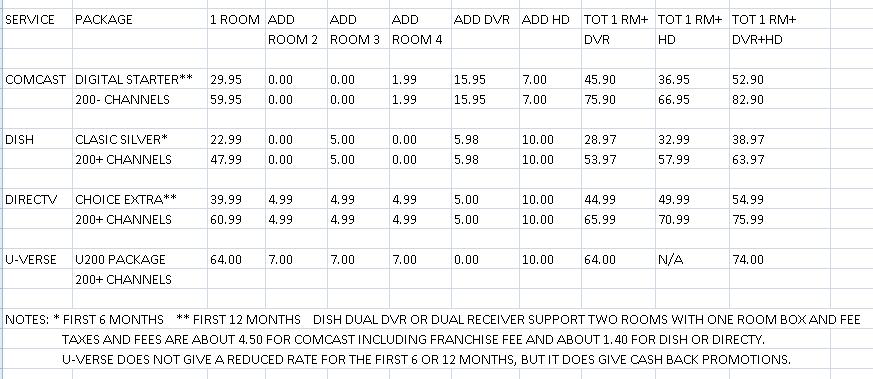
Sample Pricings of Television Services in San Jose, CA Area
My Choice for a Television Service
Image Retention on a LCD Screen
Comcast Set-top Box Costs and Requirements
Tips on VCRs and the digital conversion
Digital TV conversion troubles not over yet due to transmission and antenna issues
How to pick the best high-definition TV package
AT&T U-Verse Television Service
Comcast Digital Starter Channel Lineup
OEM D/A Converter Box and OEM DVR Operating Problems with Comcast Cable
A Way to Watch Program A and Record Program B at the same time
TiVo Series 2 DVR Capture, Networking, and Miscellaneous Functions
Information on Television Service Plans
Comcast - See http://www.comcast.com/Shop/Buyflow/Default.ashx?SourcePage=Cable&lid=1ShopDigitalCable&lpos=Nav
Dish Network - See http://www.dishnetwork.com/packages/programming/default.aspx
DirecTV - See https://www.directv.com/DTVAPP/wizard/buildYourSystem1.jsp?footernavtype=-1
AT&T DirecTV - See https://swot.sbc.com/swot/dtvCatalog.do?do=entertainmentSubCategory&subCat=EntertainmentPackages
AT&T U-Verse - See https://uverse1.att.com/un/launchAMSS.do?GUID=0FDB944C-9350-45A9-95C1-1E87A9DE08DE&target_action=SelectOffer&categoryId=WEB1 (Use ZIP 95125 if no service at your ZIP)
TiVo - See https://www3.tivo.com/store/boxes.do
What do I need to do to be ready for the end of analog TV broadcasting
There is good information at http://www.nbc11.com/digital/index.html on getting ready for digital TV.
The following was extracted from http://www.dtv.gov/consumercorner.html which contains an article titled “What do I need to do to be ready for the end of analog TV broadcasting?”
"Because Congress mandated that the last
day for full-power television stations to broadcast in analog would be June 12,
2009, all over-the-air TV broadcasts will be in digital after that date. If you
have one or more televisions that receive free over-the-air television
programming (with a roof-top antenna or "rabbit ears" on the TV), the type of TV
you own is very important. A digital television (a TV with an internal digital
tuner) will allow you to continue to watch free over-the-air programming.
However, if you have an analog television, you will need a digital-to-analog
converter box to continue to watch broadcast television on that set. This
converter box will also enable you to see any additional multicast programming
that your local stations are offering. Do not wait until June to prepare. Many
stations may be converting early and you need to be ready beforehand. Apply now
for coupons and purchase and hookup your digital to analog converter box. Start
receiving the benefits of digital today.
To help consumers with the DTV transition, the Government established the
Digital-to-Analog Converter Box Coupon Program. The National Telecommunications
and Information Administration (NTIA), a part of the Department of Commerce,
administers this program. Every U.S. household is eligible to receive up to two
coupons, worth $40 each, toward the purchase of eligible digital-to-analog
converter boxes. The coupons may only be used for eligible converter boxes sold
at participating consumer electronics retailers, and the coupons must be used at
the time of purchase. Manufacturers estimate that digital-to-analog converter
boxes sell from $40 to $70 each. This is a one-time cost. For more information
on the Digital-to-Analog Converter Box Coupon Program, visit the NTIA’s website
at www.dtv2009.gov, or call 1-888-388-2009 (voice) or 1-877-530-2634 (TTY)
Cable and satellite TV subscribers with analog TVs hooked up to their cable or satellite service should not be affected by the June 12, 2009 cut-off date for full-power analog broadcasting. (True if you have a Comcast cable card in you set top box or a vendor's satellite set top box.)”
Televisions Services in the San Jose, CA Area
There are four choices for Television service in the San Jose area which are Comcast cable, Dish Network, DirecTV and AT&T U-Verse, but AT&T U-Verse service is available in only about a third of San Jose at present (see availability at https://uverse1.att.com/un/launchAMSS.do?target_action=serviceabilityCheck). Buying DirecTV through the AT&T DirecTV partnership will result in a lower cost if you are an AT&T customer.
Comcast simulcasts HD (High Definition), SD (Standard Definition), encrypted QAM (Quadrature Amplitude Modulation), and analog NTSC (National Television System Committee) over the cable. Analog televisions and VCR's are only able to receive the analog signals. HD TV's are able to receive HD, SD, and analog signals, and the "channel up" and "channel "down" enables selecting the desired type (sub channel) after using the numeric keys to select a channel. Only cable set top boxes or OEM boxes with a cable card are able to receive and decode the encrypted QAM channels. Dish Network and Direct TV use DVB-S (Digital Video Broadcasting – Satellite) forward error coding and modulation standard for satellite television, and the transport stream delivered is mandated as either MPEG-2 or MPEG-4. AT&T U-Verse is a fiber optic IP TV based service.
There are three types of tuners, excluding those required for satellite. NTSC (National Television System Committee) tuners are used to receive the standard analog over-the-air and analog cable channels. ATSC (Advanced Television Standards Committee tuners allow a set to tune to those same frequencies, but when it "sees" an SD (Standard Definition) or HD (High Definition) signal, it is able to receive, demodulate and decode it. The Comcast set top boxes have a cable cards and QAM (Quadrature Amplitude Modulation tuners built-in to receive and decode Comcast encrypted channels The Comcast cable card stores subscriber information and codes for unlocking and viewing scrambled digital-cable signals.
Cable QAM for HDTV Tuner Cards
QAM is short for Quadrature amplitude
modulation, which is a scheme for sending TV signals
via cable. QAM64 is typically
used for the cable music channels, and other standard definition stations.
QAM256 is used primarily for High Definition signals. Both QAM64 and QAM256 will
put a number of sub channels on a single channel number. Digital sub channels are
a means to transmit more than one independent program at the same time on the
same frequency. This is done by using data compression techniques to reduce the
size of each individual program stream.
Comcast uses everything below 54 MHz for phone, Internet, and On Demand.
Analog channel 2 is at 54 MHz and every analog channel after that is 6 MHz apart
up to channel 100. If there are empty analog channel numbers, those frequency
bands may be used by digital channels. Only one analog channel can fit into a 6
MHz band but if it is used by digital channels, a band can supports multiple
channels (sub channels) up to a total of 38.6 mb/s on a 256QAM system. Typically
digital standard definition (SD) channels use between 2.5 mb/s to 3.5 mb/s so
approximately 10-16 digital SD channels can fit into one 6 MHz band. High
definition (HD) channels are anywhere from 10 mb/s to 19 mb/s so either 2 or
three HD channels can fit into a 6 MHz band. Also HD and digital SD channels can
be intermixed into one 6 MHz band.
Above channel 100 are the remainder of the digital channels. The set top box (STB)
acquires a map from the head end to map the digital channels to the displayable
channel on the STB. Since there are various size cable systems and mapping can
be done by the STB, there isn't any fixed channels when it comes to digital.
Digital television in the United States supports multiple program streams
over-the-air, using a virtual channel numbering scheme in which the channel
number is suffixed with ".2" or ".3" to indicate a second or third program
carried by the same station at the same time. By convention, ".1" is normally
used to refer to the digital version of the station's main signal and the ".0"
position is reserved for analog channels. for more information, go to
http://en.wikipedia.org/wiki/QAM_tuner
CableCard is a plug-in card approximately
the size of a credit card that allows consumers in the United States to view and
record digital cable television channels on digital video recorders, personal
computers and televisions without the use of other equipment such as a set top
box (STB) provided by a cable television company. The physical CableCard
that is inserted into the host device is a PCMCIA type II card which handles
decryption of video, and making sure that only people that have paid for the
channel may view it. This is also known as "conditional access module" function.
There are two kinds of physical CableCards:
1. An "SCard", or "single stream" card, can decode a single channel at a
time. The SCard specification was specified in the CableCARD 1.0 set of
specifications.
2. An "MCard", or "MS-CableCARD" is considered a multiple stream card. It
can decode up to six channels simultaneously. MCards were specified in 2003 but
have been frequently delayed. They became available prior to July 2007, when the
integration ban took effect.
A portion of the CableCARD 2.0 proposals that will be available prior to
approval of the remainder of the specification regards the multistream cards (MCards).
Some DVR manufacturers are postponing the integration of CableCard slots into
their machines until after MCards are available. Others, such as Sony, TiVo and
Microsoft bypassed the MCard delays and record two channels by using two SCards.
MCards were expected in the spring of 2007, but appear to still be under
development..
For all the details, go to http://en.wikipedia.org/wiki/CableCARD
If you view high definition (HD) programming, you have to be concerned about aspect ratios. Make sure you set each device to the setting that matches the TV to which it's attached: 4:3 for standard TVs, 16:9 for wide-screen monitors (nearly all HD TVs). Aspect ratio is the fractional relation of the width of a video image compared to its height. The two most common aspect ratios in home video are 4:3 (also known as 4x3, 1.33:1, or standard) and 16:9 (16x9, 1.78:1, or wide-screen). All the older TVs and computer monitors you grew up with had the 4:3 shape--only 33 percent wider than it was high. On the other hand, 16:9 is the native aspect ratio of most HDTV programming; it is 78 percent wider than it is tall, or fully one-third wider than 4:3. For more information see http://www.cnet.com/4520-7874_1-5140690-1.html
Television Picture
Quality
High-definition television (HDTV) uses one of two formats: 1280 × 720 pixels in progressive
scan mode (abbreviated 720p) or 1920 × 1080 pixels in interlace mode (1080i).
Each of these utilizes a 16:9 aspect ratio. (Some televisions are capable of
receiving an HD resolution of 1920 × 1080 at a 60 Hz progressive scan frame rate
— known as 1080p60, but this standard is not currently used for transmission.
HDTV cannot be transmitted over current analog channels.
Standard definition TV (SDTV), by comparison, may use one of several different
formats taking the form of various aspect ratios depending on the technology
used in the country of broadcast. For 4:3 aspect-ratio broadcasts, the 640 × 480
format is used in NTSC countries such as the USA.. For 16:9 broadcasts, the 704 × 480 (rescaled to 848 ×
480) format is used in NTSC countries.
When you tune to an SD channel on cable or satellite, you get an aspect ratio of
4:3 on an HD TV which leaves dark borders on the sides of the screen. When
you tune to an HD channel, you get the correct aspect ratio for an HD TV to fill the
full screen, and you don't have to use the "zoom" or "stretch" (causes
distortion) for a full screen picture. Also,
if you record and save many programs, one may have to record in SD to avoid
exceeding the recording capacity of the DVR. HD is an extra cost option on
all services, but most services provide local channels in HD at no
additional cost. For more information, go to
http://en.wikipedia.org/wiki/Digital_television
Dish Network Versus DirecTV versus Comcast
Article from: http://www.geekybrit.com/2008/08/tech/dish-vs-directv-vs-comcast.html
August 29, 2008 @ 7:46
am · Filed under Tech
(Note that in the San Jose area, Dish Network provides local channels in HD, but in this Fresno evaluation, Dish does not provide locals.)
So I recently sent my Perfect TV Service list to Dish, DirecTv and Comcast for
them to comment on. I told Comcast, they have to try and keep me, and Dish and
DirecTv they have to try and win my business.
Here is how each of them responded to my list. I grade each out of 3.
3 points = got it covered.
2 points = kind of, or its coming.
1 point = they have it, but didn’t tell me about it.
0 points = no way José
1. Multi room DVR.
Dish Network has their VIP 622, VIP722 series of DVR’s. It is not a true
multiroom dvr, as it is not networked, but it does allow me to watch my
recordings in 2 rooms. DirecTv is working on it, but cannot give me details.
Comcast did not even comment on it.
Dish: 3, DirecTv 2: Comcast: 0
2. HD content.
All 3 providers provide some level of HD. DirecTv has the largest lineup
followed by Dish, and then Comcast. However, Dish does not provide Fresno CA DMA
local channels in HD, they do provide an alternate HD feed.
Dish: 2, DirecTv 3: Comcast: 3
3. Same channel number for HD and SD
Channel Mapping as it is called. Dish and DirecTv both provide this, as well as
the ability to view only subscribed channels etc. Comcast forces you to remember
2 distinct numbers.
Dish: 3, DirecTv 3: Comcast: 0
4. True HD - and no twisting the figures
So this cannot really be measured unless I have all 3 services, so I did some
research on the internet. No provider provides full HD, it is all transcoder
somewhat. Both Dish and DirecTv seem to offer the best picture out of the 3,
with Comcast coming in slightly behind. Despite my best prodding no information
about the down resing was forthcoming from the providers.
Dish: 2, DirecTv 2: Comcast: 1
5. My must have channels
As I mentioned Dish does not have my locals in HD. Dish does not offer MLB extra
innings, but does carry Setanta. Comcast does not carry Setanta. The only
carrier to provide MLB in HD is direcTv so once again DirecTv is the winner
here.
Dish: 2, DirecTv: 3, Comcast: 2
6. Low hardware lease costs - minimal startup costs
Comcast has the lowest startup costs - free. Dish does have a startup cost - the
installation fee, which can be waived if you sign a 2 year contract. DirecTv has
the largest start up cost (by far), with installation, equipment and other fees.
For each provider I had the following startup costs for similar packages:
Comcast: $0, Dish: $50, DirecTv $250 (less at present).
Dish: 2, DirecTv: 0, Comcast: 3
7. OnDemand HD Content
Comcast’s OnDemand content is very strong. They have instant on HD content.
DirecTv also has a lineup that is rather large, although you have to wait before
the content has downloaded enough to your hard drive before starting to watch
it. Dish has a very limited lineup, but does offer 1080p pay movies. But what
about the free content?
Dish: 1, DirecTv: 2), Comcast: 3
8. Reliable Equipment and Service, and good support when needed
So I felt I had to split this up into 2. Firstly lets talk about hardware: The
Dish network equipment is recognized throughout the industry as being
exceptional. DirecTv suffered a horrible start to the life of its HD DVR
equipment with a lot of bugs, although these seemed to have calmed down somewhat
recently. In my opinion the Comcast equipment is exceptionally frustrating to
use. It also has suffered a lot of bugs that are starting to get fixed after 2
years of frustration.
Equipment:
Dish: 3, DirecTv: 2, Comcast: 0
Now, I really did not know what to expect from the emails and calls I made to
these providers. Firstly, DirecTv is excellent. Really, they were prompt in
their responses (usually a couple of hours), always courteous and always well
written grammatically correct english. Dish left a lot to be desired. Their
emails took on average 24 hours to be responded to. The answer to direct
questions was usually a canned sales pitch, which is very frustrating. When I
asked them not to send me another pitch, they half answered my question, and
then waited 24 hours for the second half of the question. Comcast’s customer
service is poor. Despite numerous call outs I still have my cable internet drop
out fairly frequently. I was waiting for a service credit 2 billing cycles, only
to call and be told it was not happening as it was in a hold queue. Somebody had
forgotten to enter a reason for the credit. Now the office of the president is
dealing with me things have become a lot more courteous, and my contact is
obviously more capable. But not everyone will get to deal with a senior customer
service rep.
Customer Service:
Dish: 1, DirecTv: 3, Comcast: 1
Subtotal:
Dish: 2, DirecTv: 2.5, Comcast: 0.5
9. Remote Scheduling of my DVR
Comcast have been promising this for about a year on fancast.com. No show just
now. DirecTv offer this for all their DVR’s as do Dish, although I have reports
of the Dish Online Scheduling only working for some DVR’s (Specifically the
VIP722).
Dish: 2, DirecTv: 3, Comcast: 2
10. Multimedia Center
DirecTv allow you to connect your DVR to a Intel Viiv PC to view photos, music
and more. A cool feature! If it could also stream movies, that would be great.
Dish does not have network media sharing, but will allow you to plug in your
digital camera to store the pictures on the hard drive. Comcast has no such
feature.
Dish: 2, DirecTv: 3, Comcast: 0
And the winner is…
DirecTv is the winner with 23.5 points. Dish follows closely with 21 points, and
Comcast sweeps up the rear with 14.5 points.
Let me know what you think about what I wrote. I now have decided to bump
comcast for definite. The multiroom dvr thing is still making me lean towards
Dish right now, as is the startup cost associated with directv, but on pure
features DirecTv certainly has Dish beat. Besides, I want my locals in HD.
Considerations for Choosing a Television Service
-
Comcast is phasing out analog channels 35-82 leaving only analog channels 2-34 which are mostly local channels. Analog channels 2-34 will be eliminated when an analog service is no longer offered...
-
Comcast has about 200 channels in their Digital Starter cable package. Click here to view the channels.
-
Comcast cable card enables receiving and selecting digital and analog cable channels, uniquely identifies the customer and authorizes the features to which they have subscribed, and decodes scrambled digital channels and premium programming such as movie channels
-
Comcast cable card can be plugged into some TV's. See http://tv.about.com/od/cableandsatellitetv/a/CableCARDintro.htm
-
Comcast DVR has a onetime DVR install fee of $19.99..
-
Comcast has dropped the charge for a set top box for the second and third room. Click here for more info.
-
Comcast fees and taxes are about $3 more than satellite services due a a high franchise fee
-
Comcast will be installing TiVo functionality on its DVR’s. See availability at http://www.comcast.com/Tivo/
-
DirecTV and Dish Network worked with TiVo and have incorporated TiVo functionality on their DVR’s.
-
If you buy a TiVo DVR, you have a TiVo subscription fee shown at https://www3.tivo.com/store/plans.do See feature comparison with cable and satellite at http://www.tivo.com/whatistivo/compare/compare_tivo.html
-
TiVo and DirecTV have renewed their partnership, which means a new HD DIRECTV DVR featuring the award-winning TiVo service is expected to launch to support satellite customers. See http://www.tivo.com/mytivo/directv-signup.html?WT.ac=mytivohome_directv_directvdet_lnk
-
Dish Network’s dual DVR and dual receiver each support two TV’s in different rooms which reduces the number of set top boxes and overall monthly rental cost.
-
HD (high definition) has an added cost on all services.
-
It appears that all manufactures have stopped making analog VCR’s and DVD/VCR’s with analog tuners.
-
With a set top box, it is difficult to use a VCR or DVD writer because the channel recorded is determined by the cable or satellite box.
-
If you have a dual channel DVR, you can record on one channel and watch TV on the other channel.
-
If you have a dual channel DVR, you can record on both channels and watch a TV program pre-recorded on the hard disk.
-
If you have a dual channel DVR and a dual channel receiver from Dish Network, you can record on both channels and watch live TV from a feed from the dual receiver TV2 output using its RF remote
-
Dish Network has a 500 GB HD DVR unit that holds up to 350 hours of SD recordings or 55 hours of HD.
-
DirecTV has a 500 GB HD DVR unit that holds up to 200 hours of SD recordings or 50 hours of HD.
-
Comcast has a 160 GB HD DVR unit that holds up to 90 hours of SD recording or 20 hours of HD.
-
U-Verse DVR can hold up to 133 hours of SD programming, and 37 hours of HD programming, (233 SD and 65 HD with HD or U450 package),
-
U-Verse DVR allows you to watch its recorded programs on all the other sets in the house up to 8 TVs..
-
U-Verse DVR allows 4 channel simultaneous recording or viewing. Up to 2 can be HD based on geographic restrictions..
-
Standard satellite equipment and installation are usually free after rebates. There may be additional costs if it involves interior walls or requires an excessive amount of RG6 cable (Dish Network states up to 120 feet of free RG6, but our installer used more than that without charging).
-
Dish Networks 2 TV dual units handle two TV’s in different rooms and come with two remotes (1-IR and 1-RF for distant room). DirecTV is planning to have similar hardware sometime in the future.
-
Satellite companies don’t install any required phone extension lines with jacks, but generally provide 25 foot phone extension cords to reach an existing jack.
-
A line of sight path to the satellite is required at an elevation of about 43 degrees and an azimuth of about 155 degrees in the San Jose area for Dish Network.
-
DirecTV is less expensive if you purchase it through an AT&T DirecTV partnered package which has a $5 ongoing discount if you are an AT&T customer. See http://www.att.com/gen/general?pid=11096
-
OEM Digital to Analog (D/A) converter boxes that you purchase is stores for about $50 are appropriate for over the air reception only. See http://www.avsforum.com/avs-vb/showthread.php?t=987843
-
OEM D/A converter boxes do not have a Comcast cable cards, and therefore can not decode encrypted Comcast digital channels which are becoming the majority of channels.
-
OEM D/A converter boxes do not provide you with a programming guide to correlate physical channels with Comcast numbering which is subject to constant change..
Sample Pricings of Television Services in San Jose, CA Area
My Choice for a Television Service
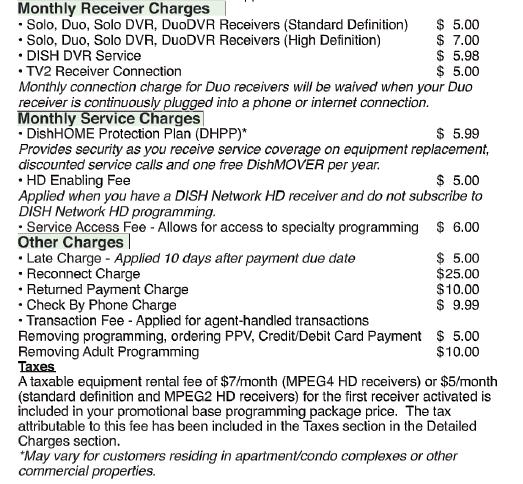
I chose the AT&T Dish four room system that includes 200 channels, a VIP722 HD dual DVR (500 GB hard drive) in the family room (feeds living room TV using an RF remote), SD dual receiver in the PC bedroom (feeds master bedroom using an RF remote). My total cost per month excluding the maintenance contract is about the same as Comcast Digital Starter without a DVR. The cost is less than DirecTV mainly because the Dish dual DVR and dual receiver have the same monthly fee as a single units. Also, at the time I signed up, AT&T partnered with Dish Network (ended 1/31/09) but continued the ongoing $5 a month discount to AT&T customers. Now that AT& T is partnered with DirecTV, AT&T DirecTV offers a $5 a month discount to AT&T customers.
On Wednesday November 14, 2007, the installation of our Dish Network satellite TV system started a little before 8 am by one installer and was completed a little after 12 pm. The installer did an outstanding job of mounting the dish exactly where I wanted it on the peak of the roof in the side yard almost out of sight from the front of the house, and it was a very neat installation. The signal strength was higher than normal, and the pictures on the televisions were excellent.
The existing Comcast cables were inadequate for "Satellite In" signals, and a RG6 cable had to be run through the attic from the dish to the family room for the dual DVR and a second cable had to be run through the attic from the dish to the PC bedroom for the dual receiver. Since the TV location in the family room was on an interior wall, the cable had to be run through the attic and down through an interior wall.
The signal outputs of the dual DVR channel 2 and the dual receiver channel 2 were transmitted backwards to my Comcast patch panel in the garage. This allowed routing the signals to other rooms using the old dual cabling in the house and using the RF remotes to control the units.
To prevent it from being a custom installation I assisted the installer, and I cut out sheetrock from the interior family room wall in two places so that the cable could be fished down the interior wall. Also, since Dish Network does not install telephone jacks, I fished a standard 4 wire telephone line through the same sheetrock holes and routed in through the attic after the install person left. The next day, I patched the holes in the sheetrock, and after a few more coats of joint compound, I primed a painted the wall. The dual receiver installation in the PC bedroom was easy since it was on the wall adjacent to the garage, so the installer was able to get to it by routing that RG6 cable out of the attic and through the garage. The installer provided an HDMI cable to connect the DVR to my HDTV which is not normally part of the free install.
Because we have six VCR’s with two in the family room, two in the PC bedroom, and two in the master bedroom, I cabled them all into the system. Also, with the setup, I have fed the PC bedroom receiver TV2 Agile modulated output on channel 73 back to the family room so that we can watch a live TV show in the family room while two recordings are active. Since it is so easy to setup DVR recordings from the Guide or a search, we will probably not record any new VHS tapes unless we want to save them permanently, and we will. phase out most of the VCR’s.
The Dish VIP722 HD DVR is about equal to the TiVo Series 3. However, the Dish DVR is leased for about $5.98 per month with no upfront cost and seems to have all the TiVo features except a high speed Internet connection even though it has an Ethernet port for future use. It does have satellite pay for view and satellite on demand access to movies for a reasonable price, and it uses a dialup internet connection for paying. Also it has two USB ports for multimedia and an external hard disk. We record shows in Standard Definition (SD) because 55 hours of High Definition (HD) recording would not be sufficient for our usage.
The following is an actual billing. Note that 57.99 programming fee consists of 47.99 for 200 channels, 5.00 for local channels, 5.98 for HD DVR, and a 0.98 discount. The fee would be 5.99 less if Dish Home Protection Plan (maintenance contract) were dropped. Since I wanted to keep the HD DVR for capacity and discontinued HD programming to save money (except for free locals), there is a charge called a HD Enabling Fee of 5.00 of which 3.00 is credited out. The billing postings are very confusing especially during the first few months.
.
|
 |
(Total without Dish home protection plan 5.99 charge 61.35)
Comcast Set-top Box Costs and Requirements
From: http://www.mercurynews.com/ci_11594570
Many Bay Area Comcast
customers will soon need set-top boxes
By Troy Wolverton
Mercury News
Posted: 01/30/2009 06:44:16 PM PST
Many Comcast customers who receive analog cable will soon have to get a set-top
box to keep watching most channels.
The company is upgrading its system in the Bay Area, moving 47 basic channels
that it now delivers via analog signals to digital transmissions.
The changes will begin about March 9 in Pleasanton and Santa Clara and continue
a week later in San Mateo, San Carlos, San Rafael and other cities. The company,
which has started telling affected customers, has not said when it will make the
upgrade in San Jose. But it plans to complete the Bay Area revamp by the end of
the year.
Digital signals require less bandwidth than analog ones, said Andrew Johnson, a
Comcast spokesman. The change will free up space to offer all customers more
high-definition channels and faster Internet connections.
"We can give customers more of the services they are wanting," he said.
For now, Comcast won't charge customers extra for the digital channels, Johnson
said. And it plans to hand out up to three set-top boxes per subscriber for no
extra charge.
The upgrade will allow Comcast to offer on-demand programs, some of which it
charges extra for, to customers who previously couldn't get them, Johnson said.
Also, to offer customers higher — and more expensive — packages of channels,
Comcast needs them to be digital subscribers first.
Bill Nusbaum, a senior telecommunications attorney at The Utility Reform
Network, a nonprofit utility industry watchdog group, worries that Comcast will
use the switch to digital transmissions as an excuse to raise cable rates.
"They can say all they want about (not charging for the upgrade), but the point
of fact is that they've been increasing their rates every year," he said.
The upgrade affects customers who subscribe to Comcast's analog expanded basic
cable service, which offers channels from 2 to 82. About 20 to 25 percent of
Comcast's customers in the Bay Area — or about 340,000 to 425,000 subscribers —
get that level of service, Johnson said.
As part of the upgrade, Comcast will move channels 35 to 82 to digital
transmissions. In order to view those channels, customers will need to have
either a digital-ready set-top box from the company or a device or television
that can accept a cable card.
The company is essentially upgrading its analog expanded basic customers to its
entry-level digital service, Johnson said. The digital package costs on average
about $1 more than the analog service, and that price difference will continue
even though both sets of customers will soon be getting the same service.
At no additional charge, Comcast will give each affected customer one advanced
set-top box that can receive on-demand programs and up to two regular boxes that
don't have that ability. The company expects that to satisfy most customers, who
on average have 2.8 televisions.
Customers who want an additional advanced set-top box will be charged $6.99 a
month. Those who want additional regular boxes will pay $1.99 a month for each
box.
In order to receive the boxes, subscribers will need to contact Comcast. The
company has set up a special Web site and phone number for those requests.
Subscribers can put in their set-top box requests at any time, even if the
company hasn't yet said when it plans to upgrade its lines in their city.
The upgrade will not affect subscribers to Comcast's lowest tier service, which
delivers only local television stations. The company will continue to deliver
those as analog transmissions, even though most of those channels will soon be
available only in digital over the air.
Federal law requires most over-the-air stations to cease analog transmissions
and broadcast only in digital beginning on Feb. 17, although that may be
delayed. The law doesn't affect cable companies, but many are moving to transmit
channels digitally as well. After the digital broadcast transition, Comcast
plans to convert the over-the-air channels to analog for its entry-level
subscribers, which make up about 11 percent of its customer base in the Bay
Area.
Separately, Comcast is testing out a free wireless Internet service for its New
Jersey customers in stations and parking lots near the state's transit lines.
The test is in its early stages, but a company official said Comcast is
considering taking the service nationwide if the test goes well.
Tips on VCRs and the
digital conversion
From:
http://www.mercurynews.com/ci_11794244
Mar 02, 2009 (San Jose Mercury News - McClatchy-Tribune Information Services via
COMTEX) -- Mercury News The upcoming transitions by broadcast stations to
digital signals and by Comcast cable to digital channels have caused a lot of
confusion among local consumers, who have flooded me with questions.
Following an article I wrote earlier this month, many have been concerned in
particular about how their VCRs will be affected by these transitions. Below are
answers to some of the most frequently asked questions I've been getting. I'll
address questions on the other issues in a future report.
Q How will my ability to use my VCR be affected by the transition from analog to
digital broadcast television? A If you've got an older VCR or DVD-VCR
combination machine that does not include a digital broadcast tuner, you will no
longer be able to use it to tune in broadcast channels once the analog stations
are switched off. And because you can't tune in stations directly with the VCR,
you won't -- without additional equipment -- be able to record broadcast
television, watch one station while recording another or program your VCR to
record particular channels at particular times.
Q Will I still be able to use my VCR to watch videos I've previously bought or
recorded? A Yes. However, if you install new equipment to allow you to receive
the digital signals or record them, you may need to adjust how your VCR is
connected to your television. If so, in order to watch prerecorded movies or TV
episodes, you may have to flip a switch or use a remote control each time you
turn from watching broadcast television to watching a recorded program.
Q How can I continue to use my VCR to watch one over-the-air program while
recording another? A If your VCR is connected to an older television that does
not have a digital tuner, you'll need to get two digital converter boxes for
that one TV. The converter boxes translate the digital broadcast signals to
analog ones that your TV and VCR can understand.
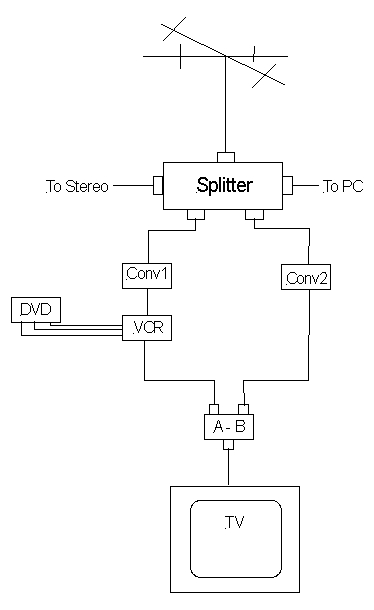
The setup is somewhat complicated. You'd need a splitter to send the signal
coming from your antenna off in two directions, one to each converter box. One
of the two converter boxes would then connect to the VCR.
Unless you have a TV that can accept multiple plugs for video input, you'd then
have to connect both the VCR and the second converter box to a switch that will
allow you to toggle between the two video signals. The switch can then be
connected directly to the TV.
The Federal Communications Commission has a diagram depicting this set-up on its
Web site: www.fcc.gov/cgb/consumerfacts/converterbox_vcr.html (See "Set-up #2")
If you have a newer television that has a digital tuner, the setup is simpler.
Although you'll still need a splitter, you only need a converter box for your
VCR. One signal from the splitter would go directly to the television. The other
would go to the converter box, then to the VCR and then to the television.
Q After the transition, will there be a way to continue programming my VCR to
record particular stations at particular times? A Yes. After connecting your
converter box to your VCR, one way to do it would be to leave the converter box
on and tuned to the station you want to record. Then you would instruct your VCR
to come on at a particular time and record the channel to which the converter
box is sending its video signal, typically channel 3 or 4.
The problem with this, of course, is that you wouldn't be able to set up your
VCR in advance to record more than one channel, unless you were manually
switching stations on the converter box.
To be able to program your VCR to record video from more than one channel, you
need to make sure you get a converter box that itself has a programming feature,
typically called an "event timer" or a "VCR timer." After connecting a device
with that feature to your VCR, you would program the converter box to turn on
and tune into a particular channel at a particular time. You'd then program your
VCR to come on at the same time and record channel 3 or 4, depending on what
channel your converter box is set to deliver its video signal.
Fortunately, you can get a converter box with a VCR timer for $40 or a little
more, or about the same price as one without the feature. And you can generally
use the government-provided $40 coupons to help pay for them.
Unfortunately, there are only a handful of such boxes on the market, and they
can be hard to find, even online. Among the converter boxes that have such
timers are the Zinwell ZAT-970A and Dish Network's TR-40, DTVPal and DTVPal
Plus.
Q How will my VCR use be affected if I'm a Comcast cable customer? A Similarly.
Over the next year, Comcast is converting some 50 basic channels -- essentially
those ranging from channel 35 to channel 85 -- from analog to digital
transmissions. Some newer TVs and DVD-VCR combination devices include a digital
cable tuner, often referred to as a QAM tuner, that allows them to tune in the
digital channels.
But most VCRs don't. That means, just as with the digital broadcast transition,
Comcast customers will not be able to use their VCR to record digital channels,
watch one digital channel while recording another or program their VCR to record
a particular digital channel at a set time.
Q What equipment will I need to get? A Generally, you'll need to get one or more
set-top boxes to be able to view and record the new digital channels. Comcast
says it will provide for no additional charge up to three set-top boxes,
including one advanced and two basic ones, to customers that currently get
extended basic (analog) cable.
Q Once I have a set-top box, will I be able to watch one program while recording
another with my VCR? A Yes, but only if you have two set-top boxes attached to
the same television. The setup is basically the same as that for broadcast
television viewers who want to do the same thing.
Q Will I still be able to program my VCR to record shows? A No. Unlike the
converter boxes with VCR timers, neither Comcast's advanced nor its basic
set-top box can be programmed to tune in to particular channels at set times.
Contact Troy Wolverton at twolverton@mercurynews.com or (408) 920-5021.
To see more of the San Jose Mercury News, or to subscribe to the newspaper, go
to http://www.mercurynews.com. Copyright (c) 2009, San Jose Mercury News, Calif.
Distributed by McClatchy-Tribune Information Services. For reprints, email
tmsreprints@permissionsgroup.com, call 800-374-7985 or 847-635-6550, send a fax
to 847-635-6968, or write to The Permissions Group Inc., 1247 Milwaukee Ave.,
Suite 303, Glenview, IL 60025, USA.
Digital TV conversion troubles not over yet due to
transmission and antenna issues
From: http://www.mercurynews.com/business/ci_11900956?nclick_check=1
By Troy Wolverton
Mercury News
Posted: 03/16/2009 12:01:00 AM PDT
Thanks to a range of transmission and reception issues, residents who are
currently able to tune in analog, over-the-air stations may not be able to get
those stations' digital transmissions — even if they get a converter box. In
some cases, consumers can solve those issues by upgrading their antennas. In
other cases, they won't be able to solve them at all.
"It's a big issue," said Chris Murray, senior counsel at Consumers Union, the
nonprofit publisher of Consumer Reports.
Unfortunately, few residents may be aware of the problems they face tuning in
digital TV. That's because most of the discussion to date about the digital
transition has focused on making sure broadcast viewers have a digital tuner in
their home, either in the form of a new TV or a converter box. What hasn't
gotten a lot of attention is that consumers wanting to get the new signals may
need to invest in an antenna also, and even an antenna might not guarantee
reception.
"The antenna issue is something that (the government) wasn't emphasizing enough
to begin with," said Mark Wigfield, a spokesman for the Federal Communications
Commission, which is helping oversee the transition to digital television.
"We're trying more to emphasize it."
Nationwide, some 8.5 million households live in "reception challenged" areas,
meaning they will be programming from at least one of the national networks.
But the problems receiving the new digital signals may be particularly acute in
the Bay Area. Reception of TV signals can be impeded by hilly terrain and tall
buildings, both of which can be found here. Also, signals weaken the farther
they have to travel, which could pose problems for South Bay residents, because
many local television stations broadcast out of San Francisco, about 50 or more
miles away.
Meanwhile, many Bay Area stations are switching the frequency at which they
broadcast their signals, which in some cases could make them more difficult to
receive. Others are changing the location of their transmitters, which could
affect the ability of viewers in huge geographic areas to receive their signals.
Thanks to these changes, large numbers of local viewers could find themselves
unable to tune in the new digital channels. Some 337,000 Bay Area residents —
many of them in the South Bay — who formerly were able to get an analog signal
from KTVU will not be able to receive the digital one, according to a study
commissioned by the FCC in the fall. For KRON, the number is around 148,000.
All told, of the approximately 400,000 Bay Area households that only get
broadcast television, some 154,000 live in reception-challenged areas where
they'll be able to get four or fewer digital stations, according to Centris.
The Bay Area "is a really good example of a market that's going to have some
issues," said David Klein, an executive vice president at the research firm.
Already, people are having problems. In the days surrounding Feb. 17, the
original deadline — now postponed — for the digital transition, more than a
third of the calls placed to Federal Communications Commission help centers
focused on reception or signal loss issues, according to Wigfield.
Burlingame resident Jane Pearcy, 49, is among those losing out. Pearcy can tune
in analog channels 2, 4, 5 and 7 with a simple indoor antenna. But she can't
tune in those stations' digital transmissions, despite having a converter box
and attaching to it a more sensitive indoor antenna.
"At this point, we haven't bothered to switch over" to digital TV, Pearcy said.
Consumers have been led to believe that all they need to do to receive digital
over-the-air signals is get a digital tuner, whether by buying a new television
or getting a digital converter box, noted Klein. But in order to tune in the
digital signals, they may also need to upgrade their antennas, he said.
"If you have a converter box, that's all fine and well, but it doesn't mean
you're ready," he said.
In planning the digital transition, the government made the assumption that
anyone who wanted to get broadcast television already had a rooftop antenna. But
that's not the case. Centris estimates that 80 percent of households receiving
over-the-air broadcasts have an indoor antenna mounted on their television. Such
antennas are typically less able to tune in weaker signals and are subject to
much more interference that can come within a house.
With analog transmissions, a weak or poor signal typically meant a fuzzy picture
or one with ghosting — multiple versions of the same image. With digital
transmissions, a weak signal can mean a picture that cuts in and out — or
doesn't come in at all.
The problem can get complicated. If you can't get particular digital signals
now, that doesn't mean you won't receive them after the analog signals are shut
off. As part of the transition, several local stations plan to boost their
digital signals and even change the frequency at which they are broadcast.
KGO, for instance, is currently broadcasting its digital station on UHF channel
24. After June 12, it will switch the digital station to VHF channel 7, the
channel on which it is currently broadcasting its analog station. As part of the
switch, the company plans to physically move its transmitter up Sutro tower,
which should allow the signal to reach more people in the area.
At least 10 other local stations also plan to switch the channel on which they
are broadcasting come June 12.
That's why, some consumer advocates say, consumers may want to wait before
spending a lot of money to install a new rooftop antenna. Instead, they say,
they might want to do whatever they can shy of that until after the transition,
such as scanning and rescanning for channels using their converter box, testing
out their signal with their current antennas or buying inexpensive indoor ones
to see if they make any difference.
"Some number of consumers will find a new antenna will help them," said Chris
Murray, senior counsel at Consumers Union. But he advises that consumers should
"do all the things that don't cost any money first."
Image Retention on a LCD Screen
In home entertainment
applications, many do not realize that prolonged presentation of those vertical
or horizontal gray or black bars, say when viewing 4:3 program content over a
wide-screen LCD panel, is also a form of semi-static image. These should be
avoided by choosing an aspect ratio or zoom setting that expands the image to
fill the whole screen area.
Similarly, try not to pause a picture on your LCD TV for too long, nor allow
station logos, program menus, etc., to remain still on the screen for an
extended period. If for some reason, you need to pause a film or a show to do
something else, it is better to turn off your LCD TV set. True that a few
minutes in this state would not do any harm, but what if you forgot all about
your TV after having say answered a phone call?
Finally, you should always power down the display panel during those periods of
inactivity.
For more information, go to
http://www.practical-home-theater-guide.com/image-sticking.html
How to pick the best
high-definition TV package
By Deborah Yao
From:
http://www.mercurynews.com/ci_12117309?IADID=Search-www.mercurynews.com-www.mercurynews.com
Associated Press
Posted: 04/10/2009 02:47:55 PM PDT
Updated: 04/10/2009 06:27:04 PM PDT
So you got a good deal on a flat-screen, high-definition TV set from a retailer
desperate to increase sales in the recession. Now you're ready to watch your
favorite shows in astoundingly crisp and clear transmission.
First, though, you need to sign up for HD programming — unless you want to limit
yourself to over-the-air broadcasts that are in high-definition.
But which HD package is best? Do you go with the one offered by your local cable
company or opt for satellite — or, in some places, a TV package from the phone
company?
This choice can be hard because the packages, which run from about $45 to more
than $100 a month, are marketed in a way that makes the truth elusive. Cable,
satellite TV and phone companies all claim to have the most HD content.
Obviously, they can't all be right.
What's going on? Well, the companies back up their boasts by blurring some
important distinctions.
For instance, the channel count can be stuffed with repetitive content. DirecTV,
which boasts more than 130 HD channels, counts one HD movie channel as two if it
repeats its lineup in the Eastern and Pacific time zones.
Similarly, Dish Network claims 124 HD channels, but that counts pay-per-view
channels that have the same movies or shows, just at different times of the day.
Verizon Communications beefs up its HD roster with about 400 how-to videos, such
as "How to Boil Water." Whether you want to watch that at all, let alone in
high-def, is questionable.
Time Warner Cable has said its HD service is free. But in New York City, it's
free to get 94 of about 100 channels. If you want the entire channel lineup,
it's an extra $9 a month. Also, HBO HD may be free, but you still have to buy
the HBO premium channel to get it.
"All the different service providers are inflating channel counts," said Jim
Willcox, senior editor for Consumer Reports magazine.
The market is competitive because HD is a potential treasure trove: At the end
of 2008, 41 percent of U.S. households had at least one HDTV set, but only 23
percent were receiving HD programming, according to Forrester Research.
Not all providers can offer more than 100 HD channels, because they have limited
bandwidth on their networks. Cable operators are trying to reach that level by
shifting some of their channels from analog transmissions to digital, which is
more efficient, to free up more space for high definition broadcasts.
For instance, the nation's largest cable TV provider, Comcast, expects to start
moving 30 to 70 analog channels to digital in half its markets by year's end.
For now, though, Comcast's HD channel availability varies widely by market. It
offers 30 HD channels in Philadelphia but 100 in Boston. Cox Communications
plans to offer 80 HD channels by year's end, up from around 50 now.
In the meantime, satellite services, which are all digital, might offer you more
HD channels. Back on Earth, Verizon's FiOS fiber-optic service also is all
digital and offers an HD channel count that is competitive with satellite TV.
But FiOS is not offered in most cities yet.
According to a survey of 10 pay-TV operators in 20 markets released in February
by Pike & Fischer, the most HD channels were available on DirecTV, Verizon and
Time Warner Cable. The laggards were Charter Communications and Comcast.
Naturally, that count is disputed.
Comcast's rivals include "a lot of fluff" such as counting a one-day sporting
event as an HD channel, said Derek Harrar, Comcast's senior vice president and
general manager of video services. Comcast pushes another method: It measures
its HD package in terms of "choices," or the number of individual TV shows,
movies, concert clips and other content available live or on demand. Comcast
says it has nearly 1,300 such choices. Cox will have 1,000 choices by year's
end, up from 600.
So how can you cut through all this and find the best deal? Here are five tips:
Ignore the claims about HD channels or choices. Compare the providers on content
you and your family actually want to watch, such as regional sports games,
movies and children's programming.
Dig into the extra services that might be available. For instance, Comcast is
offering TiVo's user-friendly interface with HD digital video recorders in some
markets. DirecTV and Cox plan to offer that later this year. Dish offers an HD
digital video recorder with Slingbox, which lets you watch satellite programming
on a PC or any broadband-connected device.
Study the picture quality. DirecTV and Dish are offering some movies in 1080p,
the highest resolution available from a pay-TV operator. To fully enjoy it, you
need a TV set that can show 1080p. And if you don't have one, take heart: 1080p
offers only minor improvements over other resolutions known as 720p or 1080i.
Know the long-term price. Promotions are enticing, but find out what the HD
package will cost after the deal ends. It's a hassle to switch providers later
on, unless you can haggle to extend the promotion. Also, make sure you scope out
hidden extra fees that may make the upfront price of an HD package less
attractive.
Embrace free HD. Most of the nation's 1,700-plus TV stations are broadcasting in
high-definition, although there's more HD programming during prime time than
other hours. You'll also get more HD shows if you're in or near a big city. To
make the most of these over-the-air transmissions, get a decent HD antenna for
as little as $30 and set it up right. For help, check out AntennasDirect.com or
AntennaWeb.org, which is backed by the Consumer Electronics Association and the
National Association of Broadcasters.
AT&T U-Verse Television Service
AT&T U-verse is a suite of Internet Protocol (IP)-based products and services, including television, broadband internet, and VoIP telephone service. U-verse utilizes fiber-to-the-node, fiber-to-the-curb, and fiber-to-the-premises technology to obtain speeds up to 25 Mbit/s to the user's home. AT&T is attempting to leapfrog current cable television-and-internet services by offering features like a DVR that can record up to four shows at a time and is programmable from any web-connected computer.
U-verse TV is delivered over IP from the head end to the consumer's set-top box. U-verse uses H.264 (MPEG-4 AVC) encoding which compresses video more efficiently than the traditional MPEG-2. Broadcast channels are distributed via IP multicast, allowing a single stream (channel) to be sent to any number of recipients. The system is also designed for individual unicasts for video on demand, central time shifting, start over services and other programs desired by only one home at that particular time. The set-top box does not have a conventional tuner, but is an IP multicast client which joins the IP multicast group corresponding to the stream ("channel") desired. In the IP multicast model, only the streams the customer uses are sent. The customer's connection need not have the capacity to carry all available channels simultaneously.
The customer's premises are served primarily by VDSL from large fiber fed neighborhood boxes, known as VRADs. The network was designed for speeds of 20-25 megabits down, 1 to 3 megabits up, with the majority of the bandwidth devoted to the TV programming. These speeds are generally reliable within 3,000 feet (900 m) from the neighborhood gateway, though AT&T has announced they will bond two pairs of wires to extend those speeds to 5,000 feet (1,500 m). The technology allows homes closer than that to receive higher speeds downstream, possibly 70-80 megabits up to 1,500 feet (500 m), but AT&T does not offer those speeds.. AT&T has local facilities (cross connects) within 5,000 to 6,000 feet (1,500 to 1,800 m) of most homes, some of which already are fed by fiber. Inside the customer's home the new services are carried over Ethernet or a HomePNA home CATV network.
Comcast Digital Starter Channel Lineup
From: "Comcast Ecare Bay Area" <vidsupport_bay@cable.comcast.com>
To: <munch@sjpc.org>
Sent: Thursday, November 08, 2007 4:39 AM
Subject: Re: Web Form Submission: General Inquiry/General Setup Questions
(KMM27838112V25523L0KM)
Dear Russell,
The channel lineup is listed below (for Digital Starter):
1 On Demand*
2 KTVU-2 (FOX)
3 KNTV-11 (NBC)
4 KRON-4 (My Network)
5 KPIX-5 (CBS)
6 KICU-36 (IND)
7 KGO-7 (ABC)
8 KTSF-26 (IND)
9 KQED-9 (PBS)
10 KTEH-54 (PBS)
11 TV Guide Channel
12 KBCW-44 (CW)
13 KBWB-20 (IND)
14 KDTV-14 (UNI)
15 Community Channel
16 KKPX-65 (I TV)
17 KCSM-60 (PBS)
18 KSTS-48 (TLMD)
19 KTNC-42 (Azteca)
20 KFSF-66 (TF)
21 KCNS-38 (IND)
22 C-SPAN
23 C-SPAN 2
24 KSBW-8 (NBC)
25 KTLN-68 (IND)
26 Campbell Government Channel (Campbell Only)
26 Civic Center TV
27 CCN 1
28 CCN 2
29 The Discovery Channel
30 California Channel (M-F 9AM-3:30PM)
30 Leased Access (All other hours)
31 Home Shopping Network
32 KMTP-32 (IND)
33 WGN
34 QVC
35 Food Network
36 FX
37 TNT
38 ESPN
39 ESPN2
40 Fox Sports Net Bay Area
41 TBS Superstation
42 USA Network
43 MTV
44 VH-1
45 Spike TV
46 Lifetime
47 A&E
49 AMC
50 The Learning Channel
51 Animal Planet
52 ABC Family
53 Nickelodeon
54 Cartoon Network
55 The Disney Channel
56 CNN
57 CNN Headline News
58 CNBC
59 Fox News
60 MSNBC
61 The Weather Channel
62 The History Channel
63 Comedy Central
64 E!
65 Court TV
66 Hallmark Channel
67 Home & Garden TV
68 Galavision
69 AZN
70 BET
71 Travel Channel
72 TV Land
73 Sci-Fi Channel
74 Mun2
75 Country Music Television
76 Leased Access - Shop NBC
77 Access Television Network
81 VERSUS
82 The Golf Channel
149 Movieplex*
186 KNTV - Weather
189 KQED - Encore
190 KQED - World
191 KQED - Life
192 KQED - Kids
194 KGO Plus
195 KGO AccuWeather Now
421-426 Sports Pay-Per-View
439 NBA TV (Season League Pass)
440 NBA.Com
441-449 NBA Pay-Per-View
461-470 NHL/MLB Pay-Per-View
800 Pay-Per-View Previews
801-802 Pay-Per-View Hits
814 Preview Movies On Demand
832 Pay-Per-View Preview
853 Playboy (Adult Pay-Per-View)
901 Showcase
902 Today?s Country
903 Classic Country
904 R & B Hits
905 Bluegrass
906 R&B and Hip-Hop
907 Classic R&B
908 Smooth R&B
909 Rap
910 Metal
911 Rock
912 Arena Rock
913 Classic Rock
914 Alternative
915 Electronica
916 Dance
917 Adult Alternative
918 Soft Rock
919 Hit List
920 Party Favorites
921 ?80s
922 Retro-Active
923 ?70s
924 Solid Gold Oldies
925 Singers & Standards
926 Big Band & Swing
927 Easy Listening
928 Smooth Jazz
929 Jazz
930 Blues
931 Reggae
932 Soundscapes
933 Classical Masterpieces
934 Opera
935 Light Classical
936 Show Tunes
937 Contemporary Christian
938 Gospel
939 Radio Disney
940 Sounds of the Seasons
941 Musica Urbana
942 Salsa Merengue
943 Rock en Espaqol
944 Pop Latino
945 90's
960-989 Digital FM Channels
Please feel free to contact us if you have any more questions. You may
respond directly to this email. Thank you for your interest in Comcast.
Thank you for choosing Comcast.
Sincerely,
Charlie
Comcast Customer Care Specialist
OEM D/A Converter Box and OEM DVR Operating Problems with Comcast Cable
The following email outlines some of the problems encountered when OEM equipments is used in conjunction with Comcast cable.
Note that the Comcast pricing in the email is obsolete.
----- Original Message -----
From: JOHN ZIMMERMAN
To: Russ Munch
Sent: Monday, February 18, 2008 5:59 PM
Subject: Re: Converting to Digital Television
Hi Russ,
Here is some of my experiences relating digital tuners. I'm not a good technical
writer but will do my best. If you find more information, would appreciate
getting it.
I purchased a Samsung SIR-T451 over-the-air tuner box (about a year ago) for use
with over the air digital stations. Connected it to our UHF antenna and found
that most stations are now transmitting digital channels. If fact, Channel 9 has
a whole bunch of sub-channels: 9.1, 9.2, 9.3, 9.4, 9.5. Also channel 54 and
several other stations have many programs - even programs not available over
Comcast. Internet program schedule sites provide listing for all over-the-air
channels and sub-channels.
We had analog Comcast service as our primary viewing service. All of our TV sets
have analog tuners. Gracia liked the Hallmark channel and in November 2007
Comcast changed that channel to a digital-only channel, so we lost it. I heard
from a friend that if a digital tuner was connected to the incoming Comcast
cable, you would get a lot of digital channels even if you don't have digital
cable service. I tried it and yes, there were a lot of digital channels, but
couldn't find the Hallmark channel. The channel format was similar to the
over-the-air digital channels in their numbering (i.e. 90.1, 91.2, 92.1, 92.3,
92.4, 92.5, 92.10, 93.8, ..... 119.1, 119.2, 123.40) but didn't correlate to
Comcast listings. I also have a Panasonic PV-V4600 DVR that has a digital tuner.
It has an auto-channel-detection mode with two options: Antenna and Cable I
selected 'Cable' and it found the same (or similar) Comcast channels as found on
my digital tuner box (Samsung). Some (most) of the digital channels gave blank
(black) screens, but there were about 80-100 channels that had programs running.
I couldn't correlate the channel numbers with the regular Comcast channels that
go from 1 to 999 with no sub-channels.
For a dollar more (Note pricing has changed from values in this paragraph), we
could get introductory digital service with lots of benefits including
On-Demand, On-screen menus, and more channels than the analog service. I checked
the Comcast internet site and found that they had a special introduction price
for digital service for $33.00 per month for the first 3 months. When I went to
their store (So. 10th St), they said that the $33.00 price lasts for 1 year. Our
price was reduced from $55.00 to $33.00 for this first year. They were very
friendly and helpful. In a year, I guess it will go back up to the $56.00 price.
According to the Comcast website, their price included one box rental.
Additional boxes could be rented for $6.00 each per month (pricing has changed
and second & third boxes are now free). Their Q&A also
implied that if you have other digital tuners, you can receive the digital
programming but without the On-demand and Menu features included with their
boxes. It sounded like we could receive the digital channels with numbers shown
on programming guides. After getting digital service, I expected channels on my
digital tuner devices to change, but saw no change in numbering and we still had
the sub-channels.
I called the Panasonic service and they said that we need a QAM tuner (with a
cable card) to receive
the Comcast channels and what we were now getting was just 'side bands' signals.
He said that the QAM is a proprietary Comcast cable spec but the FCC required
Comcast to share it with third party manufactures in July 2007. Panasonic's next
recorder to be released in March 2008 may have a QAM tuner.
I have checked the internet and also Fry's Electronics and they have devices
with QAM tuners now, but they seem to imply that numbering has the sub-channel
format and a maximum channel of 150 -- the same as my current digital tuners. I
haven't been able to find a salesperson that understands what's going on. I even
read an article in our local community paper by a guy that owns a business that
sets-up video home systems and he welcomes questions. I sent him my questions
and he didn't seem to give any additional information. My question was. "Getting
a new TV set with a digital tuner and using Comcast still requires that the TV
set be tuned to channel 3 only (or use audio/video input types) and it still requires us to use
a digital box rented from Comcast. Why and what are the options?" Its just
'stupid' to pay for a tuner. Why not buy a monitor without a tuner? We have
discovered that most DVR's and the few VCR's now available don't have tuners in
them so that seems to be the direction things are going.
I told Gracia that I will get her a digital box from Comcast, but she doesn't
want another piece of electronic equipment with another remote control. A new TV
set doesn't seem to be adequate for Cable service.
Comcast told me that it wasn't their decision to go digital, but the FCC's
requirement. I went to an FCC Internet site and their Q&A said that the digital
edict was only for over-the-air communications and the Cable Companies can do
what ever they want. I think that Comcast will continue to provide analog
signals even after February 2009, but I don't know. We still get those analog
signals with our digital service.
Please let me know if you have any questions, comments, or new information.
Thanks.
John Zimmerman, johnzim@msn.com